Who we work with · Private higher education

Higher education software for private universities: applications, student records and tuition fees

Private universities, engineering schools, business and management schools: your registry lives through the same seasons as a school, with higher stakes. Scoliom Scolarité keeps it all on one platform, the same one that schools use: from the online enrolment request to the student's record, and on to the first invoice.

  • From the online form to the first invoice — the enrolment request becomes a file, then a record, then an instalment plan, with nothing typed twice
  • Fees followed student by student — instalment plans, numbered receipts and arrears follow-up checked by a person before anything goes out, in your institution's own currency
  • Documents verifiable by QR code — school certificates, enrolment confirmations and report cards, all entered in the register
  • Timetable and calendar included — in every plan, from Scoliom Logiciel
The registry without the right tool

Three situations every higher-education registry knows

Application season

Requests come in by email, at the desk and over the phone, sometimes twice for the same applicant. One spreadsheet per programme, and nobody can say how many files are still waiting for an answer.

Substantial fees, in several instalments

Tuition fees are paid in several instalments, often by a parent or a guardian. When the plan lives in a spreadsheet and the receipts in a book, working out what is still outstanding means matching everything up by hand.

Certificates requested in bulk

Grants, banks, accommodation, visas: at the start of the year every student needs a certificate, straight away. The office retypes names into a Word template, and nothing then allows anyone to check that a document really was issued by the institution.

Online applications and enrolment

From the public form to the file, then to the first invoice

An applicant, or their family, fills in the enrolment request online. The request arrives in the platform's Admissions area: it is not retyped, it moves forward.

An online enrolment request

From a phone, or at the desk.

The public enrolment request form can be filled in from a phone. Applicants who would rather come in have their file entered at the desk by the registry: the follow-up is the same for everyone.

A file that moves forward step by step

The registry knows where each applicant stands.

Each request becomes a file in the Admissions area. The registry moves it forward until the decision, and a waiting list stays visible when places run short.

Admitted, enrolled, invoiced

Nothing retyped between admission and the payments desk.

Once admitted, the applicant joins the student database, is placed in a class — a cohort or a group, depending on how you organise the institution — and the instalment plan is prepared from your fees. See online enrolment and re-enrolment.

Student records

One record per student, their guardians, and a register of everything issued

On the platform a student has the same record as a pupil: the same database, the same screens.

The record, and its history

Identity, class, status (enrolled, waiting, withdrawn), documents issued and a year-by-year enrolment history.

Guardians

Each parent or guardian has a record of their own, linked to the student; the instalment plan and receipts are the family's. The family space, in English, French or Arabic, is part of the platform from Scoliom Logiciel; the Sérénité plan adds a single code per family, which opens the space for all of its children.

The register

Every official document issued — certificate, confirmation, report card — carries a number and is entered in the register: which document, for which student, by whom, when. A cancellation stays on record; it is never erased.

The Scoliom student database: counters for all, enrolled, waiting list and withdrawn, then the list with number, name, status, year group, class, section and family, with the Import, Export and Template buttons (fictional data)
A real screenshot of the student database, on a fictional school's data: a higher-education institution uses these same screens, with its own year groups and classes.
Tuition fees and instalment plans

Fees set once, instalment plans followed, reminders checked by a person

Fees and instalment plans

Everyone who pays knows what is due, and when.

Tuition fees, enrolment fees and optional services are set up once, by year group. Each student's instalment plan follows: monthly, termly or tailored, discounts included. See school billing software.

In your institution's own currency

Invoicing, instalment plans and receipts.

Invoicing, instalment plans and receipts are kept in your institution's own currency. Emails and PDF receipts go out in each family's language.

Payments and receipts

A payment recorded, a numbered receipt issued.

Cash, cheque or bank transfer: every payment is dated, matched to the instalment it settles, and produces a numbered receipt.

Reminders checked by a person

Nothing goes out until the institution has checked it.

The Collections screen lists outstanding balances and payment promises. A reminder is prepared, then someone at the institution checks it and sends it, by email or WhatsApp, from the institution's own channels. No one receives a letter the institution has not read first. See arrears reminders.

From one year to the next

Re-enrolment, as a campaign, student by student

One campaign, one file per student

The institution opens the re-enrolment campaign for the following year: one pre-filled file per student, and the campaign's progress can be read at a glance.

A file that starts from the existing record

Re-enrolment starts from the student's existing record: nothing is typed again. The file then moves from status to status, as an enrolment does, until it is approved.

A confirmation, and the history

A re-enrolment confirmation can be issued; like every official document, it is entered in the register. The previous year's history stays available, year by year.

Marks, report cards and documents

From marks to report cards, and documents verifiable by QR code

Marks and report cards

Entered by assessment, report cards with no retyping.

Marks are entered by assessment, each with its own maximum mark and weighting, and by period; averages are calculated, and report cards are generated in batches as PDFs, then published to the family space. See marks and report cards.

Certificates and confirmations

Generated from the student record, on the institution's letterhead.

School certificate, enrolment confirmation, leaving certificate: the name, class and year come from the record, with nothing retyped. School certificates are generated in French and Arabic, one at a time or for a whole class.

Verifiable by QR code

A bank or a consulate checks by scanning.

The document carries a QR code: whoever receives it scans it and checks on scoliom.com that it really was issued by the institution, with its date and number. The verification page shows only what is strictly necessary. See certificates verifiable by QR code.

The Scoliom document register: enrolment and re-enrolment confirmations, a report card and school certificates, each with its number, the pupil, the date of issue, the author and an active or cancelled status (fictional data, back office shown in French)
A real screenshot of the document register, on fictional data and with the back office shown in French: every document issued carries a number, and a cancellation stays on record.
Included in every plan

The timetable and the calendar, from Scoliom Logiciel

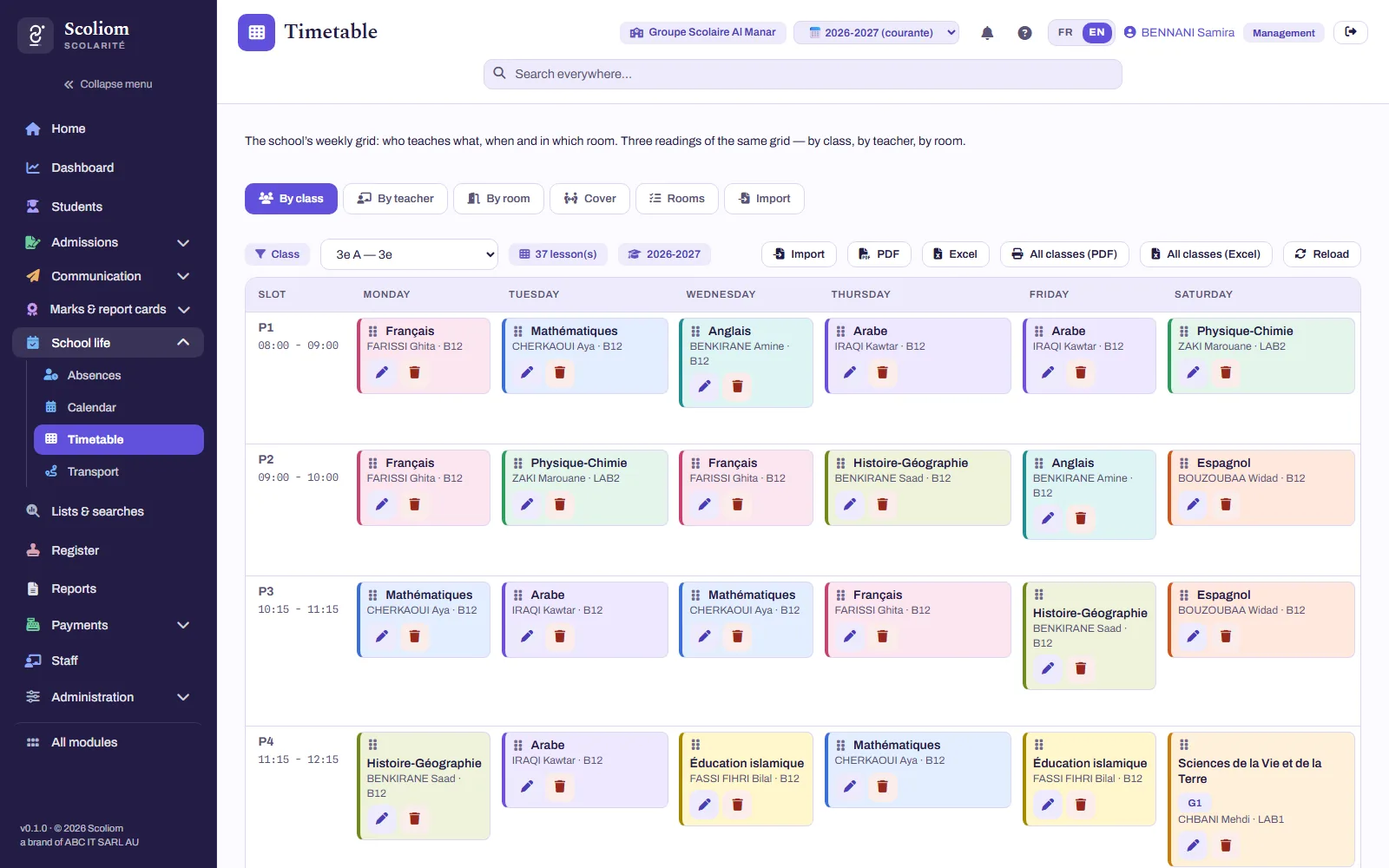
The week's timetable

Read by class, by teacher and by room: the platform will not let a class, a teacher or a room be in two places at once, and says what already holds the slot. See the school timetable.

The day's cover

A teacher is away: their lessons for the day appear, and for each one you decide — covered, turned into supervised study, or cancelled. The day sheet prints as a PDF.

The year's calendar

Holidays, examinations, meetings, public holidays: each event is addressed to the whole institution, to a year group or to a class, and only appears in the family space once it has been published.

A class timetable in Scoliom: the week slot by slot, colour-coded by subject, with the teacher and room for each lesson (fictional data)
A real screenshot of a class timetable, on fictional data.
A team behind the software

Software, and people who set it up with you

Setting up the platform — your year groups, your classes, your fees, your document templates — and bringing in your lists are done with you: included in the management contracts from the Scoliom Essentiel plan upwards, they are options with Scoliom Logiciel, costed in the same quote. The scope is confirmed in writing after the remote assessment. Your data remains yours (your data belongs to you). No IT department? From the Scoliom Sérénité plan upwards, Scoliom can also take charge of the institution's IT, supervised remotely: workstations, accounts, backups, security and support for your teams — see managed IT services for schools.

The back office and the family space are available in French, English and Arabic. See also student data security.

Frequently asked questions

Your questions about Scoliom in private higher education

Let's get started

Your higher-education institution: start with a remote assessment

A simple exchange to understand where you stand — your applications, your fees, the documents you issue, the tools already in place. Choose “Higher education / University” in the form. You receive a written review and a first budget estimate, with no commitment — see how the remote IT assessment works.

Request an assessment

No commitment · Reply within 48 working hours