How to choose school management software: the questions to ask any supplier
A sales demonstration shows what works. These questions bring out the rest: who checks messages before they go to families, how you get your data back, what is included. They apply to any supplier, ourselves included: under each one, Scoliom’s answer and the page that covers it.
No supplier named, no prices compared. The checklist at the end of the page prints on its own. What Scoliom does not do, we write down too: the list of our limits. And to place the main options before the questions: four ways to run a school, compared without naming publishers.
What your school needs, before you look at a single screen
Software is chosen against a list of needs, not of features. Before the first meeting, write down on one page what your school has to do every day:
- Your roll and your phases: how many students, which levels (nursery, primary, lower and upper secondary), one site or several.
- Your languages: the school office’s, and those your families read, which are not always the same.
- Your fee collection: tuition fees, instalment plans, the payments desk, numbered receipts — in your school’s own currency.
- Your pain points: the queue at the payments desk in September, outstanding balances, certificates retyped in Word. Note three: the demo has to solve them in front of you.
Scoliom Scolarité, our school management software, covers the school day, from the student records to the payments desk and from enrolment to the report card, with the family space on the phone. The agreed scope is confirmed in writing after the remote assessment.
Who reads a message before it goes out to families?
Software that writes to families speaks in the school’s name. A letter sent to the wrong class, a fees reminder sent to a family that has paid: hundreds of parents read the mistake, and the leadership team answers for it.
- Which messages go out without anyone at the school having read them?
- Which ones are triggered by a date or a threshold, and can they be stopped?
- Who sees the exact list of recipients before anything is sent?
No family receives a letter the school has not read. Letters home are prepared as grouped emails and WhatsApp™ links, then approved by hand before sending — never automatically; a reminder about an outstanding balance leaves on a click from the school, never on its own; and the timetable’s Notify button sends nothing without a decision by the leadership team or the school office, day by day. See family communication and following up outstanding balances.
Can you get all your data back, and in what format?
Student files, marks, payments: these are the school’s own assets. The supplier hosts them; it does not own them. Ask before signing, while the answer can still be written into the contract.
- Can you export everything yourselves, at any time, without raising a request?
- In which formats? An export that only the old software can read is not an export.
- What is handed back at the end of the contract, within what period, and when are the copies deleted?
- At the start, are your current files taken over, or must everything be typed in again?
These commitments are written into the contract: identified hosting, logged access, exports in standard formats at any time — Excel or CSV, PDF for documents — and a reversibility clause with a written period and scope. Further reading: your school’s data belongs to you, leaving Excel, changing software mid-year, data security.
Can you open a demo on your own, without an appointment?
A guided demonstration shows the path the supplier has chosen. Opened by your school office, a demo shows the rest: what can be found without help, how long a receipt takes. Ask for a trial space your staff open on their own, on fictional data, isolated from any real school, and available long enough to come back the next day.
On essai.scoliom.ma you enter the name of your school, your name and your email address: your own demo platform is ready in about ten seconds, pre-loaded with fictional data. It is valid for 24 hours, extendable, and isolated from every other demo and from any real school. See how the online demo works.

Is the timetable included, or sold separately?
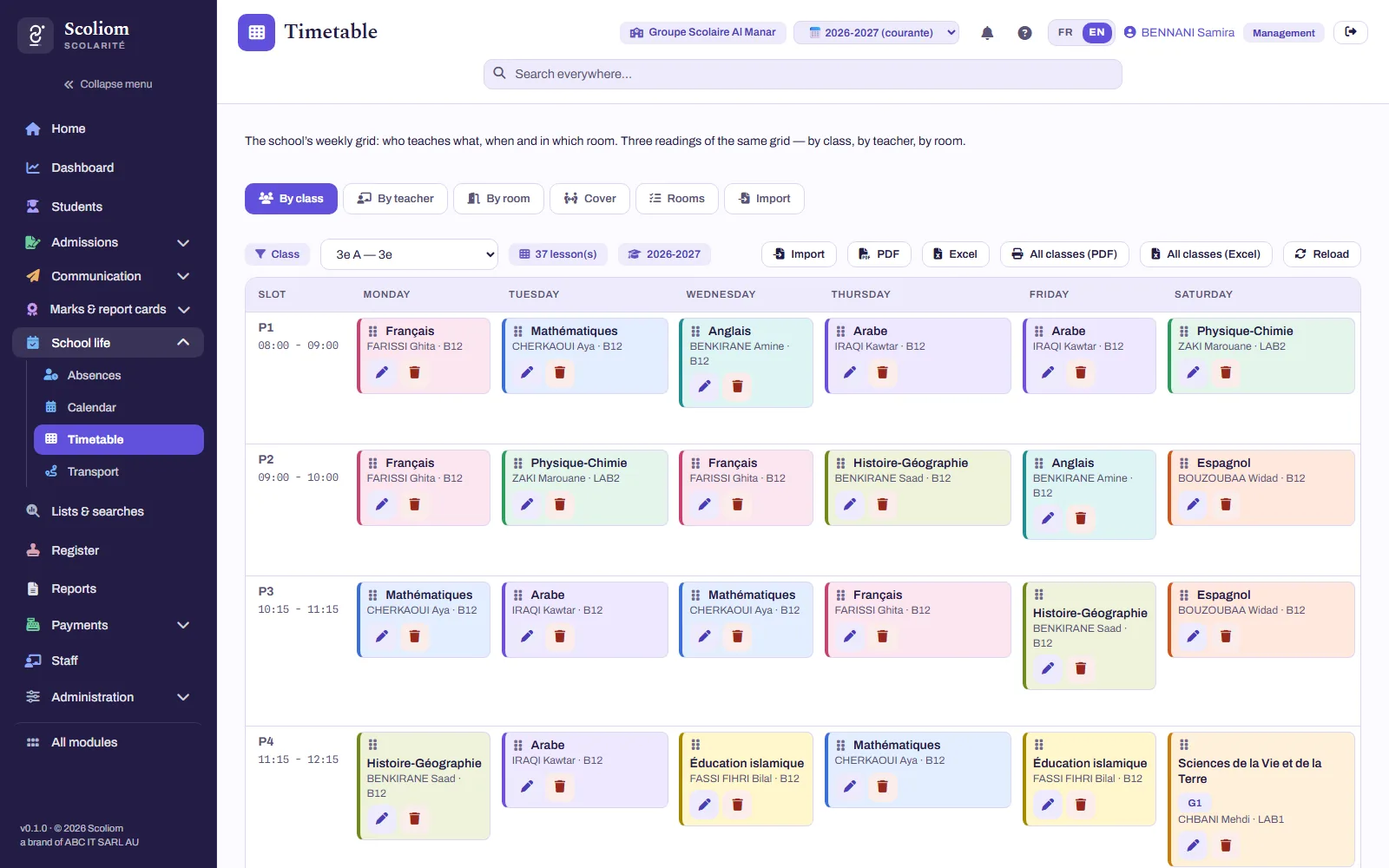
The timetable is one of the screens that change most: a teacher absent, a room unavailable. Ask whether it is part of the core offer or an option, whether it is built by hand or said to be “generated”, and what happens when two lessons overlap.
The timetable is included in every plan, from Scoliom Logiciel upwards, and so is the school calendar. The timetable is built by hand, lesson by lesson — Scoliom does not generate it; before a lesson is saved, the platform refuses a class, a teacher or a room in two places at once. A teacher is absent? For each of their lessons that day, you decide: covered by a colleague, turned into supervised study or cancelled. Detail: school timetable.
In which language does the family receive its receipts?
One school often has families who read French, others Arabic, others English, and a misunderstood receipt ends up as a question at the counter. Ask which languages the family space is shown in, and whether emails and documents follow each family’s language.
The school’s interface and the family space work in French, English and Arabic — each school chooses its default language. Emails and PDF receipts go out in each family’s language. Billing, instalment plans and receipts are issued in your school’s own currency. See the parents’ app and our offer.

Can the documents you issue be verified?
A certificate of enrolment is used elsewhere: by a government office, a consulate, another school, none of which can tell whether it has been altered. Ask whether every document is numbered, entered in a register, and checkable by a third party without phoning the school.
Certificates of enrolment and leaving certificates (exeat) are generated from the student records, bilingual French / Arabic, numbered and entered in the school’s register. Each document carries a QR code: whoever scans it reaches a public checking page that confirms the entry in the register, showing only the student’s initials and class. See certificates and exeat you can check by QR.

Who answers on the first day of term?
A printer that refuses receipts, a password forgotten at the payments desk: on that day, what matters is the person who answers. Ask who, through which channel, and who trains your staff: is setup supported, or are you handed a login and a manual?
Platform setup, data migration and staff training are included from Scoliom Essentiel upwards, with one dedicated point of contact; with Scoliom Logiciel they are options, costed in the same quote. Setting up the timetable, by contrast, is included in every plan. If you wish, the Scoliom team also looks after the school’s IT: workstations supervised remotely, verified backups, staff support, every request logged and followed up. See managed IT services for schools: your software and your IT, one point of contact.
What will it cost over three years, all in?
The advertised price says almost nothing. Ask each publisher for the three-year cost, line by line: subscription, optional modules, charges per student, per family, per document or per text message, setup, data migration, training, support, planned yearly increase, and what leaving costs.
A flat fee per school, set by bands of 100 students — never charged per student, per family or per document. The amount is fixed for the school year, with no revision during the year; setup and any options are costed in the same written quote, after the remote assessment. At the end of the contract, your data is returned to you in standard formats.
The question checklist, for your meetings with suppliers
Two lines per question, one per supplier you meet: write down the answer given, then ask to see it on screen.
- Does it cover our needs and our three pain points?
- Which messages reach families without being read first?
- Exporting all our data: formats, reversibility clause?
- A demo on our own: for how long, and on what data?
- Timetable included? Overlaps refused?
- Languages of the family space, emails, receipts?
- Documents numbered, registered, checkable by a third party?
- Who answers on the first day of term, and who trains our staff?
- Three-year cost, all in: which lines, what increase, what exit cost?
Choosing school management software: your questions
With the list of your needs: roll and phases, languages, fee collection, and the three problems to solve. Then put the same checklist of questions to every supplier, and have your school office try a demo.
Yes — and unguided, with no one walking you through it. On essai.scoliom.ma, the Scoliom Scolarité demo is ready in about ten seconds, on fictional data, valid for 24 hours and extendable, and isolated from any real school.
By having it written into the contract: exports in standard formats at any time (Excel or CSV, PDF for documents) and a reversibility clause with scope and period. At Scoliom, these commitments are in the contract.
Yes: the timetable is included in every plan, from Scoliom Logiciel upwards, and so is the school calendar. The timetable is built by hand, and clashes are refused before saving.
Yes: the family space is available in French, Arabic and English, and emails and PDF receipts go out in each family’s language.
Because these questions apply to every supplier, Scoliom included, and an amount can only be compared for the same scope. At Scoliom, it is confirmed in writing after the remote assessment.
Checklist filled in? Hold it up against your school: start with a remote assessment
An exchange about where you stand: your roll, current tools, pain points. You receive a written review and a first budget estimate, with no commitment — see how the remote assessment works.
No commitment · Reply within 48 working hours